Every few years the copier contract comes up for renewal, and the same question lands on the business office: lease again, or buy this time? The salesperson has a quote ready. What the school usually does not have is a clear picture of what it prints, on which machine, and what it is paying per page today.
This article explains how a copier lease and a purchase really differ for a school, what a lease and a service contract charge for, the clauses worth reading before signing, and the usage figures to bring to the decision. The last part shows where those figures come from in KyberCopy, using the demo school's school year so far.
What a school is really deciding#
A copier is two costs, not one: the machine, and keeping it running. The machine is paid for either up front or monthly. Keeping it running means toner, parts, a technician when it jams for good, and eventually replacing it. Most of the difference between leasing and buying is about who carries that second cost and for how long.
So the question is less "lease or buy" than three smaller ones:
- How will the school pay for the machine: out of one year's budget, or spread over several?
- Who pays for toner, parts and service, and how is that charged?
- What happens at the end, when the machine is old or the school needs something different?
Leasing a copier#
In a lease, a finance company owns the copier and the school pays a fixed monthly amount for a fixed term, usually several years. The monthly payment covers the machine. Service, toner and parts are normally a separate agreement, often with the dealer, charged per side printed: the click charge. The lease and the service agreement can arrive on one invoice, which makes them easy to confuse, but they are two contracts with two sets of terms.
At the end of the term the school usually returns the machine, renews, or buys it out. What the buyout costs depends on the kind of lease. Some end with a nominal price, and the school owns the copier; others let the school buy it at fair market value, which is set at the time.
Buying a copier#
Buying means paying for the machine once, from a capital or equipment budget, and owning it. The school still needs toner, parts and service. Those can be bought as they are needed, or through a service contract, again usually charged per side. A school that owns its copier can change service provider, keep the machine as long as it is useful, and stop paying for it the day it is paid for.
Many public schools and districts also buy through a state or cooperative purchasing contract rather than on an open quote. The district's purchasing office knows which ones the school may use.
Lease vs buy: how the two compare for a school#
| Lease | Buy | |
|---|---|---|
| Up front | Little or nothing | The full price of the machine |
| Each month | A fixed lease payment, plus service per side | Service per side, or toner and repairs as they come |
| Budget line | Usually operating | Usually capital or equipment |
| Upgrade | At the end of the term, or by buying out early | When the school chooses to replace it |
| At the end | Return it, renew, or buy it out | The school keeps it, sells it or recycles it |
| Paperwork | Two contracts to read and track | A purchase, and a service contract if wanted |
None of these rows makes one choice right for every school. A lease suits a school that wants a predictable monthly figure, has no capital budget this year, or expects to want a different machine in a few years. Buying suits a school with the money now, a copier it expects to keep for a long time, and someone willing to manage service. Ask the business office which budget line the school can actually spend from: that often settles it.
What to check before you sign#
Most of the surprises in copier contracts are in the small print, not the headline price. Read these before signing, whether the copier is leased or bought.
The term, and what ends it. How long the lease runs, and what it costs to end it early. A school that closes a building or merges copy rooms will want to know.
Renewal and notice. Some leases renew on their own unless the school gives written notice within a set window before the end. Put that window in the calendar the day the contract is signed. The printer inventory template has a Contract ends column for exactly this.
The end-of-term buyout. A nominal price, a fair market value, or no option at all. Each one means a different total.
What the click charge includes. Toner, parts, labour and the technician's visit are usually in a service agreement charged per side. Paper and staples usually are not. Ask what is excluded, in writing.
Black and white and colour. Colour sides are charged at a separate, higher rate. Check both rates, and whether a monthly allowance is included and what each side over it costs.
Price changes. Whether the click charge can rise during the term, and by how much.
Service response. How quickly a technician comes when a copier is down, and whether the school is given a loan machine for long repairs.
Data on the hard drive. Many office copiers store scanned and printed pages on an internal drive. Ask how the drive is wiped or handed back when the machine leaves the building.
Bring your own numbers to the decision#
A quote is only as good as the volume it is based on. If a contract includes more sides a month than the school prints, the school pays for pages it never uses; if it includes too few, every month carries an overage. The way to avoid both is to arrive with the school's own figures:
- Sides printed each month, per copier, black and white and colour apart. The copier's own meters give this. Read them on the same day each month with a meter reading log.
- What each department prints. That shows whether one big machine or two smaller ones fits better, and which department will notice a change.
- The colour share. Colour is where most of the cost is; a school printing mostly in black and white may not need a colour copier in every room.
- What a page costs today. The printing cost per page article shows how to work it out from the current invoice, so a new quote can be compared like with like.
- Which machines are busy and which are idle. A copier that hardly prints is a lease payment buying very little.
A printer usage report answers most of these for the work sent to the copiers. The meters cover the rest.
Where KyberCopy fits#
KyberCopy does not sell, lease or service copiers, and it does not read their meters. It runs the queue in front of them: teachers send requests, the copy room checks and prints them, and every finished job is recorded with its department, printer, sheets and colour. That record is what a school brings to a lease decision.
Usage for the school year#
On the Reports page, the School year button sets the period from 1 July, the start of most school budgets, to today. The summary shows Jobs printed, Sheets used, Colour share and, when the school charges printing back to departments, Cost.
In the demo school, 259 jobs used 37,645 sheets between 1 July and 20 November, and 27% of the sheets were colour. The demo school has no records from a year earlier, so each figure says New rather than up or down.
Usage by printer#
Further down the same page, each printer is listed with the sheets it printed and any failed jobs. Each printer opens its own jobs on the copy room page, so the work behind a busy machine can be read job by job.
In the demo school, Copy Room Production printed 27,321 sheets and Copy Room Colour 10,324, so the production machine did nearly three quarters of the work. That is the machine whose contract matters most at renewal.
Two cautions when holding these figures against a quote. The report counts sheets, and a click charge counts sides, so a double-sided sheet is two sides on the invoice. And copies made at the glass, or printed without going through KyberCopy, are not in the report. Use it for the splits, and the meters for the total.
The machines themselves#
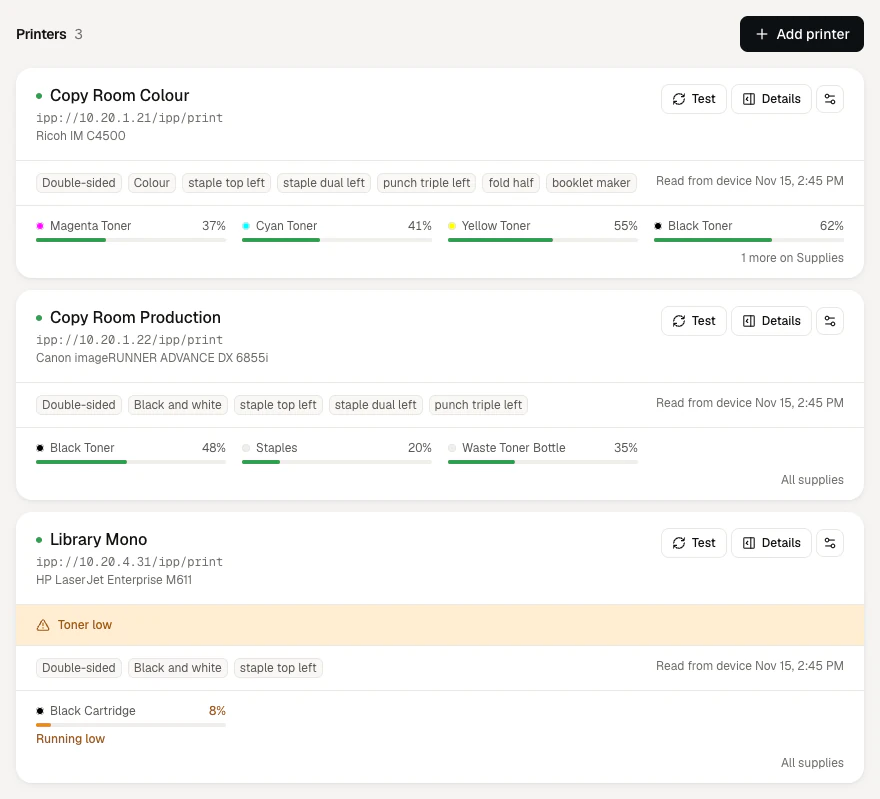
The Printers page lists every printer the relay reaches, with the make and model, what it can do and its supply levels, all read from the device rather than typed in. Before a renewal meeting it is a quick way to see what the school actually has.
The demo school's report lists two printers, but its Printers page has three: Library Mono has printed nothing through KyberCopy this year. A machine like that is worth asking about before signing for another one.
The CSV button on the Reports page downloads every job in the period, one row each, for anyone who wants to build their own comparison in a spreadsheet.
Short answers#
Is it better to lease or buy a copier for a school? Neither is always better. Leasing spreads the cost and makes upgrading at the end of the term simple; buying costs more up front and less over a long life. Which budget the school can spend from often decides it.
What does a copier lease cost? It depends on the machine, the term and the service agreement. Compare quotes on the total over the term: the lease payments, the click charges at your own monthly volume, and the buyout. The copier lease calculator does that sum for each quote.
What is a click charge? The amount a service contract charges for every side printed, usually with toner included, with a higher rate for colour.
What should a school check before renewing? The renewal notice window, the buyout, what the click charge includes, how quickly service comes, and how the hard drive is wiped. Then bring a year of meter readings and usage by printer, so the new contract fits what the school prints.