Ask any school business office where the printing money goes and the answer usually starts with colour. A colour page is not slightly dearer than a black and white one. On most copier contracts it is several times the price, and a school that prints a quarter of its sheets in colour can find that quarter is most of the bill.
This article explains why colour printing costs more than black and white, how to work out the gap for your own school from your own invoices, and how to keep colour for the work that needs it without banning it. The last part shows how KyberCopy handles colour, using the demo school's own screens.
Why colour printing costs more#
A black and white page is printed with one toner. A colour page is built from up to four: cyan, magenta, yellow and black. Every colour side draws on more than one cartridge, and the coloured toners usually cost more for the pages they print.
On a leased copier the difference is written into the contract. The click charge, the fixed amount the lease charges for every side printed, is set separately for black and white and for colour, and the colour click is the higher of the two. Some contracts also include a monthly allowance of black and white sides but none of colour, so every colour side is charged from the first.
On a printer the school owns, the gap comes from the cartridges. Divide the price of each cartridge by its page yield, add the colour cartridges together, and compare that with the black cartridge on its own.
Paper is the one thing that does not change. A colour sheet and a black and white sheet are the same sheet, so the paper cost per sheet is the same either way. The whole difference is in the sides.
Working out the gap for your school#
Do not take a figure from a vendor's brochure or someone else's school. Every contract is different, and the only number that matters is yours.
- On a leased copier, read the black and white click charge and the colour click charge off the last invoice, not the quote. Invoices show what was actually charged, including any change in rate once an allowance was used up.
- On an owned printer, work out a cost per side for black only, and another for all four toners together, from the cartridge prices you paid.
- Divide one by the other. That is how many black and white sides one colour side costs at your school.
Keep both rates, not a blend. A blended rate makes the department that only prints black and white tests pay for another department's colour posters. The article on printing cost per page goes through each part of the rate, and the printing cost per page calculator does the sum job by job with your own figures.
A worked example, with the demo school's prices#
KyberCopy's demo school, Northfield Academy, charges $0.009 per black and white side, $0.070 per colour side and $0.006 paper per sheet. They are the demo school's settings, not an average or a quote for real schools.
Take a four-page worksheet, thirty copies, printed double-sided. That is 120 sides on 60 sheets either way.
| Black and white | Colour | |
|---|---|---|
| Sides | 120 | 120 |
| Sheets | 60 | 60 |
| Sides | $1.08 | $8.40 |
| Paper | $0.36 | $0.36 |
| Total | $1.44 | $8.76 |
The paper is the same 36 cents. Everything else is the side rate, and in the demo school one colour side costs as much as nearly eight black and white ones. At those prices the same worksheet in colour costs about six times as much.
Is it cheaper to print in colour or black and white?#
Black and white, almost always, for the same page on the same machine. The exceptions are rare and come from the contract, not the toner: a lease with a large prepaid colour allowance that would otherwise go unused, for example. If you think your school has one of those, the invoice will show it.
The better question is which jobs are worth the difference. Colour earns its price where it carries meaning: a map, a chart with coloured lines, a science diagram, a parent letter with the school crest, a display poster. It adds little to a reading passage, a test, a homework sheet or anything with black text on white, which is most of what a school prints.
Grayscale and black and white are not always the same#
Many print dialogs offer both "Black and white" and "Grayscale". On most copiers they come out the same, because the copier makes greys from black toner alone. Some printers, mostly inkjets, mix grey from colour inks instead, so a grayscale page can still use colour. If a job only needs to be black and white, choose black and white. The glossary entry on black and white has the short version.
How to keep colour for what needs it#
Schools that cut colour spend rarely do it by banning colour. They do it by making black and white the easy choice and colour a deliberate one.
- Make black and white the default. On the copier itself, in the print driver on staff computers, and on any request form. Where the driver sits on school-managed computers, IT can usually set the default once for everyone rather than asking each teacher to change it. Menus differ by printer maker, so check the manual for the exact setting.
- Name the jobs that are colour. A short list in the staff handbook, such as display work, parent letters and diagrams that need it, settles most arguments before they start.
- Show the price before the job is sent. A teacher who sees the cost of a colour class set while filling in the request often picks black and white without being asked.
- Let a budget holder see the large colour jobs. A head of department who approves costly requests catches the colour run nobody needed.
- Watch the colour share, by department. Sheets in colour as a share of all sheets, month by month, shows whether anything changed.
- Use the copier's own controls where they exist. Many copiers can limit colour by user or department code at the machine. That is a setting on the copier, not something a request form can do.
How KyberCopy handles colour#
KyberCopy sits between a teacher's request and the copier, so colour is decided in a few places the copy room controls. Everything below is from the demo school, which has made-up staff and data.
Colour is set in the preset#
Teachers do not pick colour job by job. They pick a preset, such as Class Set or Poster, that the copy room wrote once. Each preset has a Colour setting with three choices: Black and white, Colour and Automatic, which leaves it to the printer. A new preset starts as Black and white, and a job prints black and white unless its preset says Colour.
In the demo school, Class Set, Worksheet and Test Packet are black and white, and only Parent Letter, Poster and Booklet are colour. The guide to writing presets walks through setting one up.
When a colour job is checked against a printer that cannot print colour, KyberCopy says so before it prints: "This printer is black and white only." On that machine the job is set to black and white, with the warning shown, rather than failing at the copier.
The request form asks, and says what it costs#
The school's starting request form asks "Colour?" with two answers, Black and white and Colour, and under Colour it says "Costs more — use when it matters". A school can turn on "Show teachers what a job will cost", and the form then shows the pages, the paper and an estimated cost from the school's own rates while the teacher fills it in.
In the demo school, 120 colour copies of a two-page document show an estimated $18.24, and because Art's budget holder approves anything over $5.00, the form also says the request needs that approval before the copy room sees it. On the approval card the budget holder sees Colour as one of the job's facts, beside the copies and the cost.
Email requests read colour in plain words#
When a teacher emails a request, KyberCopy reads the message for colour. "Black and white", "b&w", "grayscale" and "no colour" set the job to black and white. "In colour", "colour copies", "full colour" and "colour print" set it to colour. The word "colour" on its own is treated as a guess, because it may be describing the document, so it does not change the setting by itself.
Reports show the colour share#
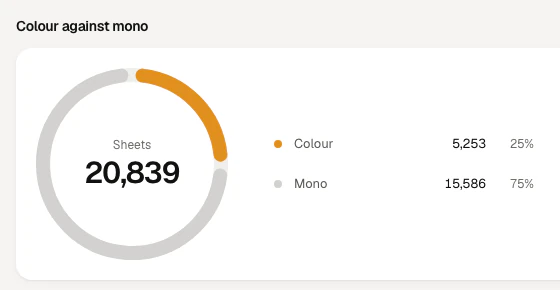
The Reports page shows Colour share beside Jobs printed and Sheets used, with the number of colour sheets under it, and the box turns amber above 40 percent. Below it, a Colour against mono chart splits the sheets for the period.
The department table has a Colour column for each department. In the demo school's October, Science and Art used similar numbers of sheets, but Science printed 38% of its sheets in colour and Art 6%, and Science cost more than two and a half times as much. The printer usage report article explains how to read the rest of the page.
What KyberCopy does not do#
There is no switch that turns colour off for one person or one department, and KyberCopy has no per-user page quotas. Colour is steered by the presets a school offers, the cost a teacher sees, budget holder approval and the reports. If a school needs a hard limit at the machine, that is the copier's own user or department code setting.
Short answers#
Why is colour printing more expensive than black and white? A colour page uses up to four toners instead of one, and copier contracts charge a higher click for each colour side.
How much more does colour cost per page? It depends entirely on your contract or cartridges. Divide your colour rate per side by your black and white rate per side, from the last invoice.
Does colour printing use more paper? No. The sheet is the same. The difference is all in toner or the click charge.
How do I set a printer to print black and white by default? Set it on the copier, in the print driver's preferences on each computer or through IT for managed computers, and on the request form. Check the printer maker's manual for the exact menu.