Every double-sided job asks one question the original document does not answer: when the reader turns the sheet over, which edge does it turn on? Get it wrong and the back of every page prints upside down.
This guide explains what long edge and short edge mean, which one each common school job needs, why the same file can come out right on one printer and wrong on another, and how a copy room can decide it once instead of on every request.
What the two settings mean#
Long edge turns the sheet like a book page. Hold a portrait page, turn it right to left, and the back reads the right way up. This is the setting for almost every portrait handout, test and worksheet.
Short edge turns the sheet like a wall calendar or a notepad flipped over the top. It suits pages that are bound or stapled along the top, and landscape sheets that are folded in half.
What "duplex long edge" means#
Duplex is the printer word for double-sided. So "duplex long edge" and "flip on long edge" both mean the same thing: print on both sides, laid out so the sheet turns on its long side. "Duplex short edge" and "flip on short edge" mean both sides, laid out to turn on the short side. Printers send the same choice in their own words; in the standard printing protocol, IPP, the three values are one-sided, two-sided-long-edge and two-sided-short-edge.
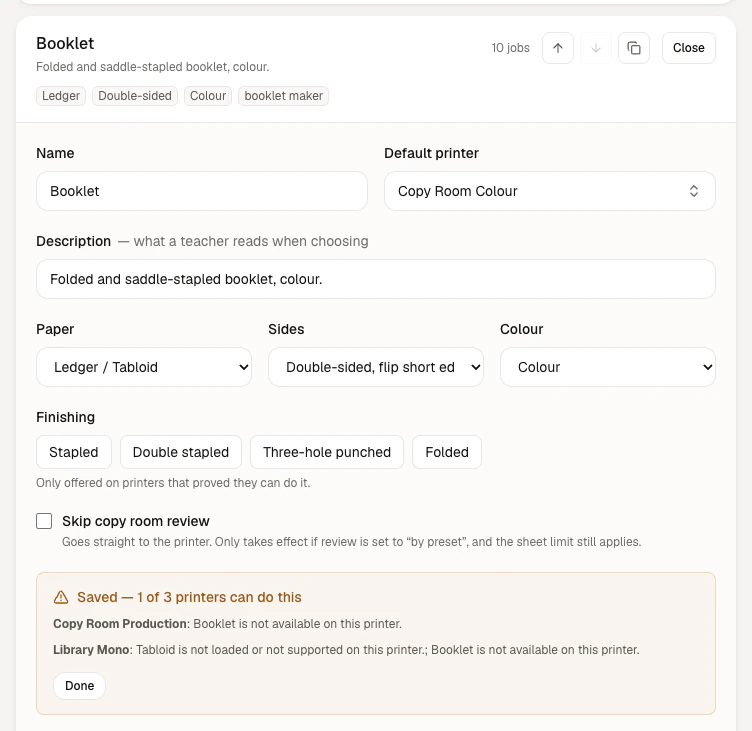
In KyberCopy the Sides choice reads Single-sided, Double-sided, or Double-sided, flip short edge. Plain Double-sided is long edge, because that is what most school work needs.
Long edge vs short edge binding#
The word binding is the clearest way to think about it. Ask where the pages will be held together once they are printed: a staple, a binder ring, a fold or a comb. Then picture the page upright, the way the reader holds it.
If the pages are held down the left side of an upright portrait page, the sheet turns on its long edge. That is long edge binding. A portrait packet stapled top left, a set punched for a three-ring binder, and a lab report clipped down the left all bind on the long edge.
If the pages are held across the top, so the reader flips each one up and over, the sheet turns the other way. Print settings call that short edge, and most print dialogs and copiers name the edge as if the sheet were standing upright in portrait, even when the page on it is landscape. A portrait pad bound across its top, a landscape handout stapled along its top, and a booklet folded down the middle all use short edge.
The setting does not move the staple or the punch holes. Those are separate finishing choices. It only decides which way up the back of each sheet is printed, so it has to agree with the finishing, or the reader turns the page and finds everything upside down.
Which one each job needs#
Portrait packets and tests#
Long edge. The staple sits top left or down the left side, and pages turn like a book.
Landscape handouts stapled at the top#
Short edge, so the back of each page is the right way up when the reader flips the sheet over the top.
Folded booklets#
A booklet prints two pages side by side on a landscape sheet, then folds in the middle. The sheet turns on its short edge. In the demo school, the Booklet preset is set to Ledger, double-sided, flip short edge.
At a glance#
| Job | How it is held | Sides |
|---|---|---|
| Worksheet or letter home | Not held, one page | Single-sided |
| Portrait packet or test | Staple top left | Double-sided, long edge |
| Binder handout | Three holes down the left | Double-sided, long edge |
| Landscape handout | Staple along the top | Double-sided, short edge |
| Folded booklet | Fold down the middle | Double-sided, short edge |
| Poster | Pinned to a wall | Single-sided |
Long edge vs short edge for landscape pages#
Landscape is where most upside-down backs come from, because the page and the sheet no longer agree about which way is up. A portrait page and a sheet of paper share the same top, so long edge almost always looks right. A landscape page is printed sideways on the same sheet, so the edge the reader thinks of as the top is, on the paper, a long side, while the setting still calls that flip short edge.
That is why a teacher who always prints portrait never notices the setting, and the first landscape handout of the year comes back with every second page upside down.
Two habits help. First, decide how the reader will turn the page before choosing anything: over the top like a calendar, or sideways like a book. Second, print one copy and turn it over by hand before running the class set. Print dialogs, drivers and copiers do not all describe landscape pages the same way, and one test sheet settles it for that machine.
Why the same file prints differently#
A document file does not carry a sides setting. A PDF holds pages; the choice of single-sided, long edge or short edge is made at the moment of printing, in whatever dialog the person printing happens to open. Two teachers sending the same file from two laptops can get two different results, and a copy room tech re-printing it later can get a third.
Some copiers also quietly ignore a duplex request. They accept the job and print it single-sided without saying so, which looks like the same mistake from the outside.
Stop choosing it per job#
The setting is easy to get wrong because it is buried in a print dialog and changes with every document. KyberCopy keeps it in the preset instead. An administrator sets the sides once, and teachers pick Class Set or Booklet on the request form.
A preset stores the paper, the sides, the colour and the finishing together. The Class Set preset in a new school starts as letter paper, double-sided, black and white, stapled top left. A Booklet preset puts short edge next to booklet finishing, so the two can never disagree on a single request.
When a printer cannot print double-sided#
Not every machine in a school can duplex, and not every duplex machine can do both edges. KyberCopy asks each printer what it supports, and the sides setting is checked against that list.
Here is what happens with a double-sided job on each kind of printer:
- The printer reports the setting. The job prints as asked.
- The printer reports it cannot do that sides setting. The job is flagged with a warning that the setting is not supported on this printer, and it would print single-sided instead. The copy room sees that before pressing Print, and can send it to another printer.
- The printer has been seen to ignore duplex before. The job carries a warning to check the first copy before running the full set.
The same check runs when an administrator saves a preset, so a Booklet preset that only one of three printers can produce says so on the day it is written, not on the day thirty copies come out wrong.
Double-sided requests by email#
Teachers can also email a request to the copy room. KyberCopy reads plain phrases such as double sided, two-sided, front and back or back to back as double-sided, long edge, and phrases such as single sided or one-sided as single-sided. It reports what it read, and the words it read it from, back to the teacher and to the copy room.
An email never chooses short edge by itself. Anything that needs a fold or a booklet, which is where short edge usually comes in, is held for a person to read rather than guessed.
Paper, not toner#
Double-sided printing roughly halves the paper a job uses, because each sheet carries two pages. It does not halve the toner, because the same number of sides are still printed. If a school chooses to price jobs in KyberCopy, it sets a rate per printed side and a separate rate per sheet of paper, so a double-sided job costs less paper and the same toner, which is what really happens at the copier. Long edge and short edge cost the same.
A checklist before the class set#
- Where will the pages be held: staple, holes, fold, or nothing?
- Is that along a long side or a short side of the sheet?
- Is the original portrait or landscape, and will the reader turn it like a book or over the top?
- Does the chosen printer support double-sided, and that edge?
- For a landscape or booklet job, has one copy been printed and turned by hand?
In KyberCopy, the first four are answered once in the preset and checked against the printer. The last one is still worth doing for anything unusual.
Short answers#
Is long edge the normal setting? Yes. For portrait documents, long edge is ordinary double-sided printing, and it is what plain Double-sided means in KyberCopy.
When should I use short edge? When the pages turn over the top, or when a landscape sheet is folded in half into a booklet.
Why is the back of my page upside down? The sheet was printed for one edge and turned on the other. Switch the setting, or print one copy and test it.
Does long edge or short edge use more paper? No. Both are double-sided and use the same number of sheets.