Every school says it wants to use less paper, and most try the same thing first: a poster above the copier and an email asking staff to think before they print. It rarely moves the number, because most of the paper a school uses is not wasted by careless people. It is used by sensible people working with settings and habits nobody chose on purpose.
This article explains where a school's paper actually goes, the copy room habits that waste the most of it, the changes that cut it without turning printing into a fight, and how to tell whether they worked. The last part shows how KyberCopy helps, using the demo school's own screens.
Where the paper goes#
Before changing anything, look at what the school prints. In most schools the bulk of the paper goes on a few kinds of job, repeated all year:
- Class sets. Worksheets, quizzes and handouts, one copy per student, for every class that teaches the lesson.
- Tests and exam papers. Long, often stapled, and printed in a rush near the date.
- Letters home. One per family, sometimes in colour.
- Display work. Posters and booklets, on larger paper and often in colour.
Waste hides inside those jobs rather than beside them. A class set printed single-sided uses twice the sheets it needs. A test with a typo on page two is printed twice. Thirty-five copies are run for a class of twenty-eight because thirty-five is what the teacher always asks for. None of that looks like waste to the person sending the job.
The habits that waste the most#
Single-sided by default#
The biggest single cause of extra paper is a default. If the copier, the print driver or the request form starts at single-sided, most jobs go out single-sided, because nobody changes a setting they did not think about. Double-sided printing halves the sheets of every multi-page job it touches.
Rounding up the copy count#
Teachers ask for a few extra in case, and the extras collect in a drawer. Over a year, a handful of spare copies per class set is a lot of paper that nobody reads.
Mistakes found after the run#
A long job printed with the wrong page, the wrong paper size or missing staples is printed again. The first run is pure waste, and it is usually the largest jobs, tests and booklets, where it hurts most.
Last-minute requests#
A job sent at 7:50 for an 8:15 lesson cannot be checked. Rushed jobs are where typos, wrong settings and duplicate requests get through, and where the copy room runs it twice "to be safe".
Work that is never collected#
Printed copies that sit on a shelf until the end of term were paid for and never used. Often the teacher printed again from the staff room printer because they could not find the first set.
Printers that quietly ignore a setting#
Some copiers accept a double-sided job and print it single-sided anyway, or skip the staple, without reporting an error. The job looks fine on screen and wrong in the tray. The article on a printer not printing double sided covers the causes.
Ten ways to reduce paper waste in schools#
None of these needs a new budget. Most need one decision and a sentence in the staff handbook.
- Make double-sided the default everywhere. On the copier's own defaults, in the print driver on staff computers, and on any request form. Single-sided should be something a teacher asks for, not something they get by accident.
- Ask for the class list number, not a round number. Twenty-eight students is twenty-eight copies, plus one for the teacher.
- Proof one copy before a long run. Print one, check the page order, the staple and the paper, then run the rest. It costs one copy and saves whole runs.
- Set a lead time for large jobs. A rule such as two school days for anything over a set number of sheets gives the copy room time to check it. The copy room policy template has a place for it.
- Have a person look at the very large jobs. A mistyped 350 for 35 should be caught by someone before it reaches a machine, not after.
- Keep colour for what needs it. Colour does not use more paper, but it is where the money goes, and a colour job reprinted is twice as expensive as a black and white one.
- Share what does not need to be on paper. Reading lists, notices and reference sheets that students only glance at can live on the school's own learning platform or website.
- Track collection. Shelve finished work in a known place, tell the teacher where it is, and note when it is picked up.
- Fix the printers that ignore settings. Check the first copy of a double-sided job on each machine, and report the one that quietly prints single-sided.
- Measure sheets, not pages. Paper is bought by the sheet, so that is the number to watch month by month, by department.
How to tell whether it worked#
A paper-saving drive without a number is a poster. Pick a measure before you start and read it the same way afterwards.
Count sheets used per month, for the whole school and by department, and compare like with like: this October against last October, not November against October, because the school calendar is not even. Look for a change in sheets per job as well as in total sheets. If double-sided became the default, the sheets for the same kind of job should fall even if the number of jobs did not.
The printer usage report article explains what such a report should show and how to read it. The copier's own meters are a useful check on the total, and the copier meter reading log keeps them month by month.
How KyberCopy helps a school use less paper#
KyberCopy sits between a teacher's request and the copier, so most of the changes above become settings rather than reminders. Everything below is from the demo school, Northfield Academy, which has made-up staff and data.
Double-sided is in the preset, not the print dialog#
Teachers do not choose sides, paper or staples one by one. They pick a preset, such as Class Set or Test Packet, that the copy room wrote once and checked against the school's printers. In the demo school, Class Set is "Double-sided, stapled top left. For one class." A new preset starts as double-sided until someone changes it.
The first preset in the list is the default on new requests and the one used for requests that arrive by email, so putting a double-sided preset at the top makes it what teachers get without thinking. The guide to writing presets walks through it.
Teachers see the sheets before they send#
With "Show teachers what a job will cost" turned on, the request form shows the pages, the paper in sheets and an estimated cost while the teacher fills it in. In the demo school, 120 copies of a two-page document printed single-sided show 240 sheets before anything is sent. The same job double-sided would be 120.
Big jobs wait for a person#
Under Copy room settings, Review, "Always review jobs over" holds any job above a number of sheets for the copy room, whatever else is set. It starts at 500 sheets. In the words beside it: "A mis-typed 5,000-copy job should never go straight to a machine." A separate limit, "Most copies in one request", refuses a request for more copies than the school allows.
When the copy room reviews a job, it can fix the settings rather than refuse it, if the school allows "Techs may change settings before releasing". A teacher can also withdraw a request herself, which is possible until the copy room releases it to a printer.
One copy to check first#
On a job of 20 sheets or more, the menu beside the copy room's Print button has "Print one to check first", which sends a single copy. If the printer has been seen to ignore the double-sided setting before, the job warns: "This printer has been observed to ignore the duplex setting. Check the first copy before running the full job."
An email request that does not say how many copies is set to one, never a guess, and the reply tells the teacher: "We assumed 1 copy because the message did not say."
Sheets used, by department, every week#
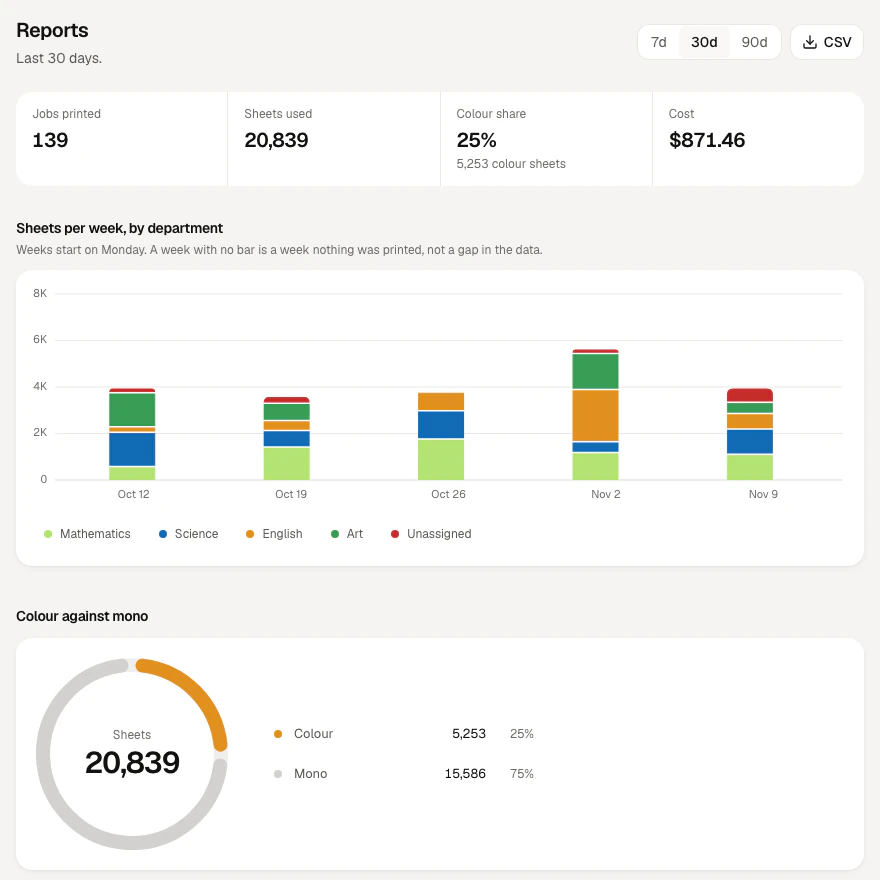
The Reports page shows Jobs printed, Sheets used and Colour share for the period chosen, with sheets per week stacked by department, counting finished work only. That is the before and after for any paper-saving change.
KyberCopy prints one page per side today. It does not lay two or four pages onto one side of a sheet, so that saving still comes from the document itself.
Short answers#
What is the quickest way to reduce paper use in a school? Make double-sided the default on every copier, driver and request form. It needs no one to change a habit.
How much paper is wasted in schools? It varies too much from school to school for one figure to mean anything. Count your own sheets for a month, by department, and start from that.
Is printing double-sided the default on school copiers? Not always. Check the copier's own defaults and the print driver on staff computers, because either can start a job at single-sided.
Does double-sided printing save toner? No. It halves the sheets, not the sides printed, so toner use stays the same. The saving is in paper.