When someone adds a network printer to a Windows computer by its IP address, the wizard asks a question most people click past: what kind of port? On a Mac or a Chromebook the same choice appears as a protocol list, with IPP near the top. Both work most of the time, which is why the question feels unimportant until the day a job vanishes.
This article explains the two ways a computer usually prints to a school copier over the network, IPP and what Windows calls TCP/IP printing, which is raw printing on port 9100. It covers what each sends, what each tells you back, which ports to open, and when to pick one over the other. The last part shows how KyberCopy uses both, and why.
The short answer#
- IPP is a conversation. The computer asks the printer what it can do, sends the job, gets a job number and can ask how the job is going.
- TCP/IP printing on port 9100 is a one-way pipe. The computer opens a connection, writes the file and closes it. The printer prints what it can and says nothing back.
Most network copiers in schools accept both, and a copy room can use either. The difference is what you learn after you press Print.
What "TCP/IP printing" means#
TCP/IP is the way every device on the school network talks, so the name says very little. When Windows offers a Standard TCP/IP Port, it means one of two older ways of sending a file over that network:
- Raw, on port 9100. The file is written straight to the printer. HP called this JetDirect, other makers call it AppSocket or socket printing, and it is the default the Windows wizard picks.
- LPR, on port 515. An older queue protocol from Unix print servers. It still works on many copiers but adds little for a school.
So when someone in IT says "we print by IP", they almost always mean raw printing on port 9100. In this article, TCP/IP printing means that.
How raw printing carries the settings#
A raw connection has no place for settings. Nothing in it says "30 copies, double-sided, stapled". Instead, the settings travel inside the file, either because the printer driver built them into the document, or because a few lines of printer job language, PJL, are written in front of it. PJL lines look like @PJL SET DUPLEX=ON and @PJL SET COPIES=30.
The printer reads those lines, applies what it understands and ignores the rest. That is both the strength and the weakness of the path. It almost always prints something. It never tells you whether it applied what you asked for.
What IPP adds#
IPP, the Internet Printing Protocol, runs over the same kind of connection a web page uses, on port 631. Because it is a conversation, a computer can do three things over IPP that raw printing cannot.
- Ask what the printer can do. The printer answers with lists: the paper sizes it holds, the sides values it accepts such as one-sided and two-sided-long-edge, colour or not, and finishing values such as staple-top-left and punch-triple-left. It also reports its state, and reasons such as toner-low or media-jam, and supply levels.
- Send a job with its settings named. Copies, sides, colour and finishing are separate fields in the request, not lines the printer may or may not read.
- Follow the job. The printer answers with a job number, and the computer can ask about that job until it is finished, and on many machines read how many sheets it used.
IPP also has a secure form, ipps, which wraps the same conversation in encryption, the way https wraps a web page. A printer hardened by a security review often turns plain IPP off and accepts only ipps.
The driverless printing on Chromebooks (how Chromebooks print at school), Macs and phones, often labelled IPP Everywhere or AirPrint, is built on IPP. That is why those devices can print to a copier with no driver installed: they ask the printer what it can do, then send a standard file.
Which ports to open#
If a firewall or VLAN sits between your computers and your printers, these are the ports that matter:
- 631 for IPP. Secure ipps uses 631 on most printers and 443 on some; the printer's web settings say which.
- 9100 for raw printing.
- 515 for LPR, only if something still uses it.
All three are connections from the computer to the printer. The printer never needs to reach back. If printers sit on their own VLAN, the rule to add is from the machines that print to those ports on the printers' addresses.
Where each one falls short#
IPP can promise more than it delivers#
IPP is only as good as the printer's own software. A printer can answer that it accepted a job, give it a job number, report it completed and print nothing at all. That is not a theory. A real HP did exactly that while the KyberCopy relay was being built: every IPP job was accepted, reported completed, counted zero sheets and left no trace in the device's own log. The same PDF written to port 9100 came out of the tray.
A printer can also accept a setting over IPP it does not apply, such as duplex on a machine whose duplex unit is switched off, and still answer that the job went fine. Some printers at least admit it with a status that says a setting was substituted or ignored. Some do not.
Raw printing says nothing back#
On port 9100 the printer never confirms anything. There is no job number, no state and no sheet count. When the connection closes without an error, all you know is that the printer took every byte. If it jams on page 40, or the stapler is empty, the computer that sent the job cannot find out from the printer.
And because settings ride along as PJL or inside the document, a printer that does not understand one quietly prints without it. Some features, such as several pages on one side of a sheet, have no common PJL spelling at all.
Choosing for a school copier#
For most schools the honest answer is: use both, for different jobs.
- Use port 9100 to print, if a machine has shown it prints reliably that way. It is what most Windows queues already use, and it is what schools already trust.
- Use IPP to read what each printer can do and how it is doing: capabilities, supplies and errors. Even printers with an untrustworthy IPP print path usually answer these questions reliably.
- Use ipps where a printer demands it, rather than turning its security setting back off.
How KyberCopy uses each one#
KyberCopy sends jobs through a small agent called the relay, which runs on a computer inside the school and connects out to KyberCopy. It splits the work between the two protocols exactly as above.
Adding a printer: one address for both#
When you add a printer, an IP address is enough. The form says "An IP address is enough. We complete it to ipp://…/ipp/print." For printing, the relay uses the same host on port 9100. A school's printer is addressed by one IP, whichever port it is spoken to on.
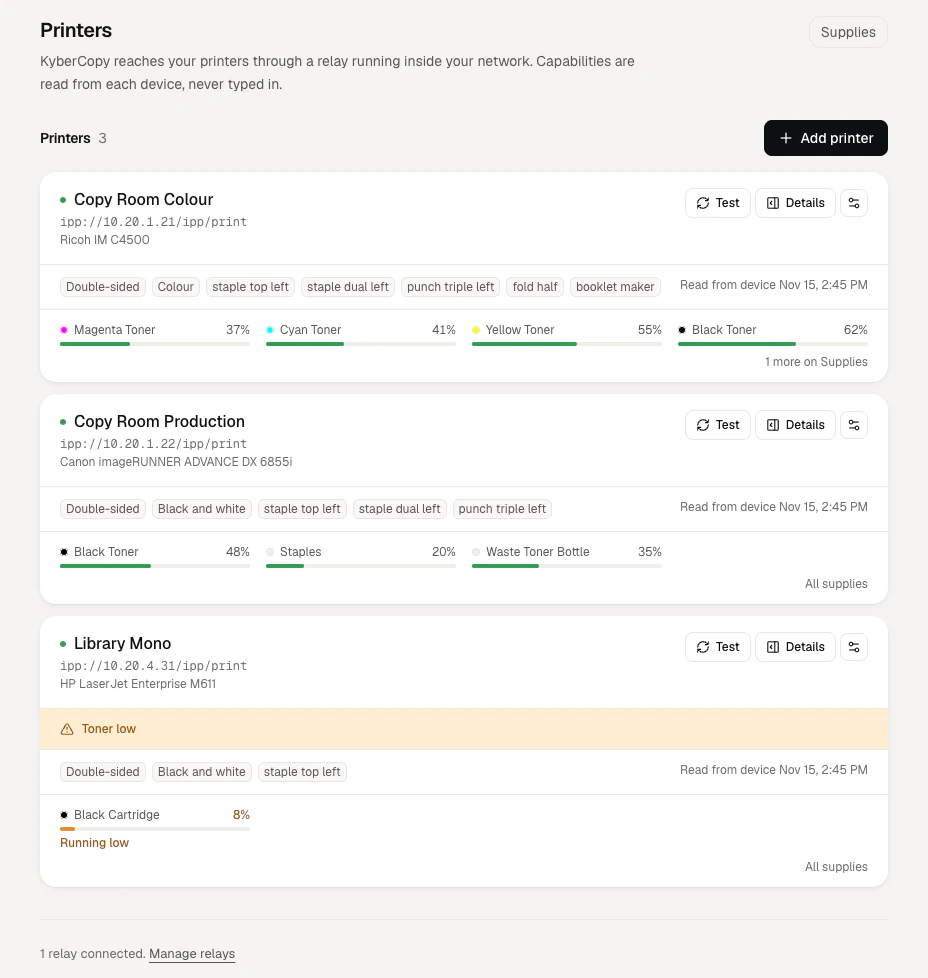
Until the relay has read the printer, the card says "Waiting for a relay to read this printer's capabilities. Until then it cannot accept jobs." That read happens over IPP.
Reading and checking over IPP#
The relay checks every assigned printer over IPP about every two minutes: whether it answers, its state and its supply levels. What the printer can do is read the same way when it is added, and read again from time to time. The Printers page shows what came back as tags, with the time it was read, next to the supply levels the printer reported. Nobody types in that a copier can staple.
Presets and requests are checked against those tags before anything prints, so a teacher does not send a stapled job to a printer that never said it could staple.
The relay never sends printer traffic through a web proxy, even if the computer it runs on has one set for filtering. A printer is always on the local network, and a proxy asked to reach a private address refuses, which would look like a dead printer.
Printing over port 9100#
Jobs go out over port 9100 by default. The relay writes PJL lines in front of each document for copies, sides and colour, and names the document's language, PDF or PostScript, instead of leaving the printer to guess. The relay also has an IPP print path, kept for a device whose raw port is closed.
Because port 9100 says nothing back, KyberCopy is honest about what it knows. The relay reports a job sent that way as handed to the printer, not as a job the printer confirmed. When a printer has not counted sheets, the sheet count on a finished job is the estimate the copy room was shown before pressing Print, not a figure from the device.
Several pages to one side of a sheet has no common PJL spelling, so on the port 9100 path KyberCopy lays every job out one page per sheet, and estimates, checks budgets and bills it that way. Estimating a 100-page job as 50 sheets and printing 100 would be a wrong bill, not just a wrong stack.
On the IPP path, a printer that accepts a job but gives no job number is not trusted either. The job is not marked printed, and the copy room is told to check the device's own queue.
When the printer only accepts ipps#
If a printer redirects plain IPP to an encrypted connection, the relay stops instead of following it, and its error says the printer only accepts encrypted printing and to change the printer's address in KyberCopy from ipp:// to ipps://. The fix is that one word in the address.
Printers make their own certificates and name them after an internal address, which no public authority will sign, so the relay accepts the printer's own certificate. That encrypts the document on the wire; it does not prove which machine is on the other end. It is still better than plain IPP, where the document crosses the network readable.
When the printer turns a protocol off#
If IPP or port 9100 is switched off on the printer, the relay's connection is refused, and the Printers page says which kind of problem it is.
"The printer answered but refused the connection. It is powered on; check that IPP or port 9100 printing is enabled on it." The fix is in the printer's own web settings, not the network. The relay needs both from the computer it runs on: IPP to read and check each printer, and port 9100 to print.
Short answers#
Is IPP better than TCP/IP printing? For learning about a printer and following a job, yes: IPP answers questions and raw printing does not. For getting paper out of a particular copier, whichever path that machine handles reliably is better.
What port does IPP printing use? Port 631. Secure ipps uses 631 or 443, depending on the printer. Raw TCP/IP printing uses port 9100, and LPR uses port 515.
What is the difference between IPP and IPPS? The same protocol, with ipps encrypted. Use ipps when the printer requires it.
Why did my job say it printed when nothing came out? Over IPP, the printer may have reported a job it never printed. Over port 9100, the computer only ever knew the printer took the file. Check the printer's own job log and its panel.
Do I need a print server for either one? No. Both are direct connections from the computer that prints to the printer. In KyberCopy that computer is the relay, and it connects out to KyberCopy, so nothing needs to reach into the school.