A teacher wants the periodic table as a hallway poster, a club wants a flyer twice the usual size, or the English department wants its poetry anthology folded into a booklet. All three start with the same sheet: 11 by 17 inches. And all three can come off the copier on ordinary Letter paper, shrunk or cut off, if one setting along the way still says Letter.
This guide explains what the names mean, how to set the size in the programs teachers use, why the copier may still print on the wrong sheet, and how a school copy room can stop choosing the size on every job.
11x17, tabloid and ledger: one sheet, three names#
11x17 is a sheet 11 inches wide and 17 inches tall, exactly two Letter sheets side by side. In millimetres it is about 279 by 432.
Tabloid and ledger are the two names for that sheet. Some software uses tabloid for the sheet standing upright and ledger for the same sheet turned on its side, 17 by 11. Most copiers, and most people in a copy room, use the names for the same paper. If a print dialog offers Tabloid and Ledger but not 11x17, either one is the right sheet; pick the one that matches the way the page should stand.
Two sizes get mixed up with it:
- Legal is 8.5 by 14. It is longer than Letter but no wider, so it is not a big sheet.
- A3 is the international size nearest to 11x17, about 11.7 by 16.5 inches. It is close, not the same. An A3 document sent to a tray of 11x17 is scaled or trimmed.
The paper sizes entry in the glossary lists all of them together.
How to print on 11x17 paper, step by step#
Two things have to say 11x17 before the copier does the right thing: the document's own page size, and the paper size in the print dialog. Then the printer has to have that paper in a tray it knows about.
In Word#
Change the page, not only the printer. In Word the setting is under Layout, then Size, where the list offers Tabloid. Set it before you lay out the page, because changing it afterwards moves pictures and text boxes. Then open the print dialog and check the paper size there says Tabloid or 11x17 as well.
In Excel#
A spreadsheet has no fixed page until it is printed, so set it in Page Layout, then Size, and pick Tabloid or Ledger. A wide sheet usually fits better with the orientation set to landscape. Check the preview: a sheet with many columns can still spill onto a second page.
From a PDF#
A PDF already has a page size, so the question is what the print dialog does with it. Check two places:
- The paper size. In the printer's own settings or properties, choose Tabloid, Ledger or 11x17.
- The scaling. Choose Actual size if the PDF is already 11x17. Choose Fit if it was made on Letter and should be enlarged to fill the bigger sheet. An option named Shrink oversized pages only ever makes pages smaller, so it will not enlarge a Letter page.
If the PDF is Letter and the dialog is set to Actual size on an 11x17 sheet, the page prints at its normal size in one corner of the bigger paper.
Printing 11x17 on 8.5x11 paper, and the other way round#
Not every printer can take the big sheet. Many small office and desktop printers stop at Legal. There are two ways round it.
Shrink it to one Letter sheet. Choose Letter as the paper and Fit as the scaling. The whole page prints at about 65 percent of its size, so small text gets smaller. It suits a proof, not the final poster.
Split it across two Letter sheets. Some PDF readers have a Poster or Tile option that prints a large page in pieces with a small overlap, to be taped together. It works for a one-off, not for a class set.
Going the other way, a Letter original enlarged to fill 11x17 is 129 percent, because 11 inches is 129 percent of 8.5. The extra length is left as a margin, because 11x17 is not the same shape as Letter.
Why the copier still printed it on Letter#
The size was set and the job still came out on Letter, shrunk to fit or cut off at the edges. The usual reasons, in the order worth checking:
- The document was still Letter. The print dialog was set to 11x17 but the page inside was not, so the printer enlarged or centred it.
- The print dialog said Letter. Many dialogs reset to the default paper for each document.
- No tray holds 11x17, as far as the printer knows. A copier picks paper by what each tray is set to. If the drawer holds 11x17 but is recorded as Letter, or nothing is recorded as 11x17, the copier either pauses and asks for paper or prints on what it has.
- The printer cannot take it at all. If the size is missing from the list in the print dialog, the driver does not think the printer has a big enough tray.
- It went to the bypass tray. On many copiers the size of hand-fed paper is set on the copier's own panel, and a size left there as Letter can win over the job.
Double-sided 11x17 has one more trap: a duplex unit that turns Letter and Legal may not turn the bigger sheet. See printer not printing double sided for that one.
Which printers can actually print it#
In the demo school, all three printers report the sizes they can take, and two of them list 11x17 among them. That is only half the answer. The other half is which tray has the paper in it.
KyberCopy keeps that on the Printers page, under Paper loaded. Each tray is recorded with the name the printer uses for it, the size and type of paper in it, and how full it is. In the demo school, Copy Room Colour holds Ledger white in Tray 2.
KyberCopy checks every job against what the printer reports. When a job asks a printer for a paper size it does not report, the job carries the message "Tabloid is not loaded or not supported on this printer." before anyone presses Print. Library Mono in the demo school reports Letter and Legal only, so an 11x17 job gets that message there.
Set 11x17 once with a preset#
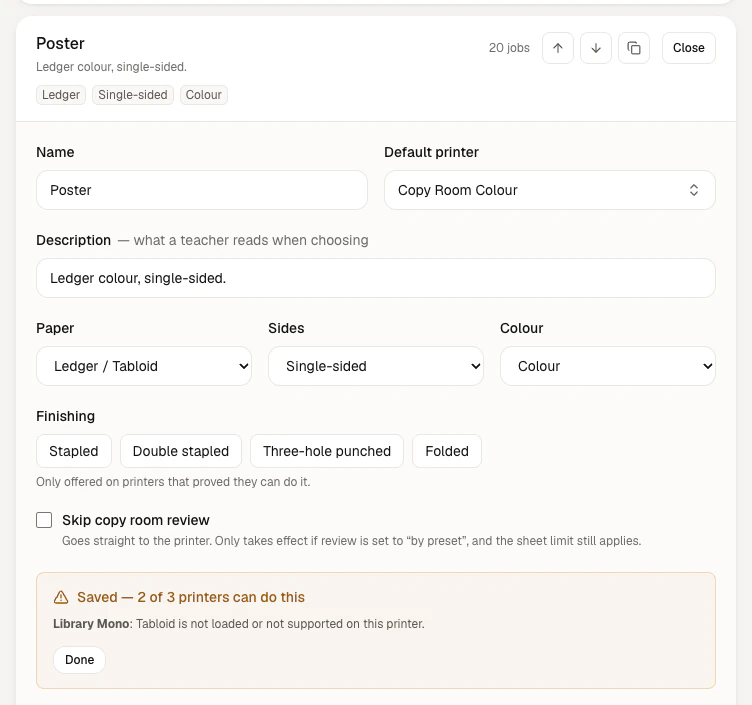
The steps above are a lot to get right on every poster. KyberCopy keeps the paper size in a preset instead. An administrator picks the paper once, from Letter, Legal, Ledger / Tabloid, A4 and A3, and teachers pick the preset by name on the request form.
The demo school has two presets on the big sheet. Poster is Ledger, single-sided and colour. Booklet is Ledger, double-sided with a short edge flip, colour, and the booklet maker.
When a preset is saved, KyberCopy checks it against every printer and names any that cannot print it, with the reason. The demo school's Poster preset comes back as "Saved — 2 of 3 printers can do this", with Library Mono named because Tabloid is not loaded or not supported on that printer. The copy room knows before a teacher picks it, not when a poster comes out on Letter.
Asking for 11x17 by email#
Teachers can also email the copy room. KyberCopy reads the request with fixed rules, not a language model, and the words 11x17, tabloid and ledger are each read as the paper asked for.
The paper is not set on the job from the email. It is written into the job's note with the words it came from, so the copy room sees "11x17" and puts the job on the right preset or tray. Picking a tray from a few words in an email would be a guess, and a wrong guess wastes a stack of the most expensive paper in the room.
Folding 11x17 into a booklet#
An 11x17 sheet folded in half makes four Letter-sized pages: two on the front, two on the back. That is how school programs, catalogues and anthologies are made.
The sheet flips on its short edge, because the fold runs down the middle of a landscape sheet. Get the flip wrong and every other page is upside down. Long edge vs short edge shows which way each kind of job turns. A printer with a booklet maker folds and staples through the fold; without one, the copy room folds by hand.
Short answers#
Is tabloid the same as 11x17? Yes. Tabloid and ledger are names for the same 11 by 17 inch sheet; some software uses ledger for it turned on its side.
Is 11x17 the same as A3? No. A3 is a little wider and a little shorter. Close enough for a poster, not for a document laid out to the edge.
Why does my 11x17 print come out small in the corner? The document is Letter and the dialog is printing it at actual size on the bigger sheet. Choose Fit, or change the document's page size.
Why does my 11x17 print come out cut off? The opposite: the document is 11x17 and the printer used Letter. Check the paper size in the dialog and which tray holds the big sheet.
What is 11x17 paper called? Tabloid or ledger. On copier trays it is often labelled 11x17 or Ledger.