The spring concert program, the poetry anthology, the science fair guide and the art show catalogue all end up the same shape: sheets printed on both sides, folded down the middle and stapled through the fold. It looks simple in the hand. It is the job most likely to come off the copier with the pages in the wrong order.
This guide explains how a booklet is laid out on the sheet, why the page count matters, how to print a booklet from Word and from a PDF, what goes wrong, and how a school copy room can send every booklet to the one machine that can make it.
How a booklet is laid out#
A booklet is not printed one page per side. Each side of the sheet carries two pages next to each other, and the sheet is folded in half. So one sheet, printed on both sides, makes four pages of the finished booklet.
The pages on a sheet are not in reading order. Take an 8-page booklet, made from two sheets:
| Sheet | Side | Left page | Right page |
|---|---|---|---|
| 1, the outside sheet | Front | 8 | 1 |
| 1, the outside sheet | Back | 2 | 7 |
| 2, the inside sheet | Front | 6 | 3 |
| 2, the inside sheet | Back | 4 | 5 |
Fold both sheets together, sheet 2 inside sheet 1, and the pages read 1 to 8. Putting the pages in that order is called imposition. Word, Adobe Acrobat and most copier drivers can do it for you, which is why the next sections are about finding the right setting rather than rearranging pages by hand.
Booklet pages come in fours#
Because every sheet makes four pages, a booklet's page count is always a multiple of four: 4, 8, 12, 16 and so on. A document that is not gets blank pages added at the end.
A 10-page file printed as a booklet becomes 12 pages on three sheets, with two blank pages at the back. That is fine for a program, where the back cover is often left plain. It is not fine when page 10 was meant to be the back cover, because it lands inside. Plan the page count before the layout, and add your own blank pages where you want them, such as inside the front cover.
Which paper makes which booklet#
The booklet page is half the sheet it is printed on.
- 11x17 paper makes a Letter-sized booklet. This is the usual school booklet, and the reason the copy room keeps a tray of 11x17, also called ledger or tabloid. See how to print on 11x17 paper for that sheet.
- Letter paper makes a half-letter booklet, 5.5 by 8.5 inches. Good for a small program or a pocket guide, and any printer that duplexes Letter can print it.
Set the document's page size to the finished booklet page, not to the sheet. A Letter-sized booklet is laid out as Letter pages; the booklet setting puts two of them on each 11x17 side.
How to print a booklet in Word#
Word has a layout made for booklets, called Book fold.
- Open Layout, then Margins, then Custom Margins.
- Under Pages, set Multiple pages to Book fold. Leave Sheets per booklet at All unless the booklet is very thick.
- Word turns the page sideways and halves it. Check the layout now, because pictures and text boxes can move.
- When you print, choose double-sided with the pages flipping on the short edge.
The flip is the step people miss. If the print dialog is left on its usual double-sided setting, which flips on the long edge, every other side prints upside down.
How to print a PDF as a booklet#
A PDF already has its pages in reading order, so the print dialog has to do the imposition.
In Adobe Acrobat Reader, open Print, and under Page Sizing and Handling choose Booklet. Set Booklet subset to Both sides and Binding to Left. Then pick the sheet: 11x17 for a Letter-sized booklet, Letter for a half-letter one. The preview on the right shows two pages per side.
Not every PDF reader has a booklet option. If yours does not, open the file in Acrobat Reader, or ask the copy room to print it.
Google Docs has no book fold setting of its own. Download the document as a PDF and print the PDF as a booklet.
The flip: always the short edge#
A booklet sheet is landscape, two pages side by side, and it folds down the middle. When it turns over, it turns on its short edge. Print it with a long edge flip and the back of each sheet comes out upside down against the front.
Most print dialogs that have a booklet mode set this for you. If the dialog asks separately, choose short edge. Long edge vs short edge has the pictures.
Fold and staple: by machine or by hand#
A copier with a booklet maker folds the stack and staples through the fold, which is called saddle stitching. Without one, the copy room prints the sheets, folds them by hand and staples through the spine with a long-reach stapler.
Two things to plan for:
- Thickness. A saddle-stitched booklet has a limit, set by the machine, on how many sheets it can fold and staple at once. A thick anthology may need to be split or bound another way.
- Creep. In a thick booklet the inside sheets stick out past the outside ones at the open edge after folding. Keep text and page numbers away from the outer edge, and expect the edge to be trimmed or slightly uneven.
Which printer can actually make it#
A booklet needs three things from one machine: double-sided with a short edge flip, the big sheet, and the fold. Often only one copier in a school has all three.
In KyberCopy, nobody keeps that in their head. The relay inside the school network asks each printer what it can do, and the Printers page shows the answers as tags, with the time they were read. In the demo school, Copy Room Colour reports fold half and booklet maker. Copy Room Production and Library Mono report neither.
Every job is checked against the printer it is going to before anyone presses Print. Send the demo school's Booklet settings to Copy Room Production and the job says "Booklet is not available on this printer." and "This printer is black and white only." Library Mono adds that it cannot print double-sided on the short edge and does not take Tabloid.
Set it once with a preset#
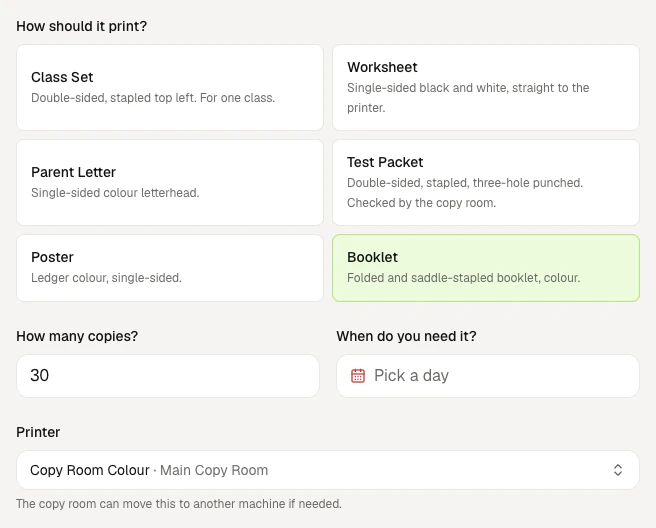
The settings above are a lot to get right on a deadline. KyberCopy keeps them in a preset, and a teacher picks the preset by name on the request form.
The demo school's Booklet preset is Ledger paper, double-sided with a short edge flip, colour, and the booklet maker. Its default printer is Copy Room Colour, so picking Booklet on the request form moves the printer to the machine that can make it.
In the queue, each booklet then shows how it will print before anything is sent: in the demo school, the poetry anthologies read Tabloid and Double-sided, short edge.
KyberCopy does not rearrange pages. The file a teacher sends should already be a booklet, from Book fold in Word or saved as a booklet PDF, or the copy room imposes it when it prints.
Booklet requests by email#
Teachers can also email the copy room. KyberCopy reads the email with fixed rules, not a language model, and a booklet is one of the things it does not guess at. An email that asks for a booklet is held with "Asked for: booklet. Needs a person." on the job, and the email back to the teacher says a member of staff will look at it.
That is on purpose. "Double sided" in the same email would be read as a long edge flip, which is right for a packet and wrong for a booklet. A person moves the job onto the Booklet preset instead.
When the copy room prints it by hand#
Some booklets are better run by a person: a cover on card stock, a thick program that needs splitting, a file that was never laid out as a booklet. In KyberCopy the copy room presses Print by hand on the job. The relay leaves it alone, the copy room prints it from its own print dialog, and marks it printed so the teacher is told it is ready.
A checklist before the booklet run#
- Is the page count a multiple of four, with blank pages where you want them?
- Is the document laid out at the finished page size, Letter or half-letter?
- Is it set to print as a booklet, double-sided, short edge?
- Is it going to a printer that reports a booklet maker, or will it be folded by hand?
- Is the booklet thin enough to fold and staple in one piece?
- Has one copy been printed, folded and read through?
Short answers#
Why are my booklet pages in the wrong order? The file was printed as ordinary double-sided pages, not as a booklet. Use Book fold in Word or Booklet in Acrobat Reader so the pages are rearranged onto the sheets.
Why is every other page upside down? The sheet flipped on the long edge. Booklets flip on the short edge.
How many pages does a booklet need? A multiple of four. Anything else gets blank pages added at the end.
What paper do I use for a Letter-sized booklet? 11x17, also called ledger or tabloid, folded in half.
Can Google Docs print a booklet? Not by itself. Download it as a PDF and print the PDF as a booklet.