A teacher picks up thirty copies of a unit test and finds every other sheet empty. Or the stack is right but there is a blank page after each copy. Or the copier took a whole ream and printed nothing but a line of symbols at the top of each page. All three get called a printer printing blank pages, and they have different causes.
Most of the time the copier is not broken. A blank page usually comes from the document, the way the job was sent, or a cartridge that is out or still sealed. This guide covers what each kind points to, the causes and checks in order, and when to call for service, then how KyberCopy shows a copy room a job's pages before the class set prints.
What kind of blank page is it?#
Look at the stack first; the pattern points to the cause.
- Every page is completely blank. Nothing reached the paper. On a laser copier that is toner that is out, a new cartridge with its seal still in, or a drum that is not seated. If the copier's own test page also comes out blank, the cause is in the printer.
- Some pages are blank, in a pattern. A blank page after every copy, or between sections, almost always comes from the document: an empty page at the end of the file, a page break after a table, or a section break that forces a new page.
- One blank page at the start or end of every job. A banner or separator page turned on at the copier or in a print server, printing as a near-empty sheet.
- Pages of symbols, or one line of code and then blank sheets. The printer read the file in the wrong language. It expected one kind of file and got another, so it printed the file's contents as text, a few characters per page.
- Blank from one computer only. A driver or setting on that computer. Other people printing to the same copier get full pages.
- Copies are blank, prints are not. The original was face up on the glass or face down in the feeder the wrong way round.
Why a printer prints blank pages#
These are the usual causes, cheapest to check first.
- The document has blank pages in it. A page break at the very end of a Word file, a table that runs to the bottom margin and pushes an empty paragraph onto the next page, or a slide deck with a hidden empty slide. The printer prints what it is given, so an empty page in the file is an empty sheet in every set. Thirty copies with one stray page is thirty wasted sheets.
- Double-sided with an odd page count. A three-page handout printed double-sided has an empty back on the second sheet. That is correct, and it is why a stapled set sometimes looks like it has a blank page in it.
- A banner or separator page is on. Some print servers and copiers add a cover page to every job. If it is set to print almost nothing, it looks like a stray blank sheet.
- The printer guessed the file's language wrong. Copiers understand a few page description languages, usually PCL and PostScript, and many read PDF directly. When a file arrives without saying which it is, the copier guesses. A wrong guess prints the file's code as text: a page of symbols, or one line per page and the rest blank.
- The wrong driver on one computer. A computer with a driver for a different model, or a generic driver, can send a job the copier cannot fully read. See print driver.
- The toner is out, or a new cartridge is still sealed. Many cartridges ship with a plastic strip or seal that must be pulled before use. A brand new cartridge printing nothing at all is often still sealed. A cartridge that has run out prints faded pages first, then blank ones.
- The drum or transfer unit is not seated or has failed. After a cartridge change, a drum unit that is not clicked fully into place can leave pages empty.
- The paper is loaded wrong for the job. Pre-printed paper, labels or letterhead loaded the wrong way round can be printed on the back, which looks like a blank front.
The checks that fix it#
Start at the top and stop when the page comes out right.
- Print the copier's own test or configuration page. If it comes out full, the printer is fine and the cause is the file, the computer or how the job was sent. If it comes out blank too, the cause is in the printer.
- Open the file and count its pages. Turn on the view that shows page breaks, and scroll to the end. Delete the empty page or the break before it. In a slide deck, look for hidden slides.
- Save the document as a PDF and print the PDF. A PDF fixes the pages as they look on screen, so a page break that moved on another computer cannot add a blank page at the copier.
- Print from another computer. If it comes out full, look at the first computer's driver and its printer preferences for a banner page or a wrong model.
- Check the cartridge. Take it out, look for a seal or strip, rock it gently side to side and put it back until it clicks. Check the toner level on the panel or the copier's web page.
- Check the drum and covers are fully closed and seated after any change.
- Look for a banner, cover or separator page setting at the copier and in the print server, if the school has one.
- Write it down. Note which machine, which computer and which file. The printer troubleshooting checklist has a fault log to write it in.
When to call for service#
Call when the copier's own test page is blank with a full, unsealed cartridge; when the panel shows a drum, transfer or toner sensor message; or when pages stay blank after a cartridge and drum have been reseated. On a leased copier, the drum and often toner are part of the service contract, so check it before buying parts. See copier lease vs buy for what a contract usually covers.
How KyberCopy handles blank pages#
KyberCopy sits between a teacher's request and the copier. It cannot remove a page break from a teacher's file or change a cartridge. What it does is send files in a way that stops the wrong-language guess, show the copy room every job's pages before it prints, and offer one copy to check before a long run. Everything below is from the demo school, which has made-up staff and data.
Teachers send a file, not a print dialog#
Teachers do not print to the copier from their own computer, so there is no driver to get wrong. They upload a file on the request form, or email it, and pick a preset.
The form says "PDF works best". Word, PowerPoint, Excel and Publisher files are turned into PDF on the server when they are sent, and the original is kept beside it, so the page breaks are set once instead of moving on another computer. A file that does not convert is kept as sent, for the copy room to open by hand, and the teacher is told so.
The copier is told which language follows#
KyberCopy's relay, a small agent on a computer inside the school, sends each job to the copier over port 9100 by default. Ahead of the file it tells the copier which language follows, PDF, PostScript or PCL, from the file's type, rather than letting it guess. That rules out the pages-of-symbols fault. Only a file whose type is unknown is left for the copier to read on its own.
The copy room sees the pages before paper is spent#
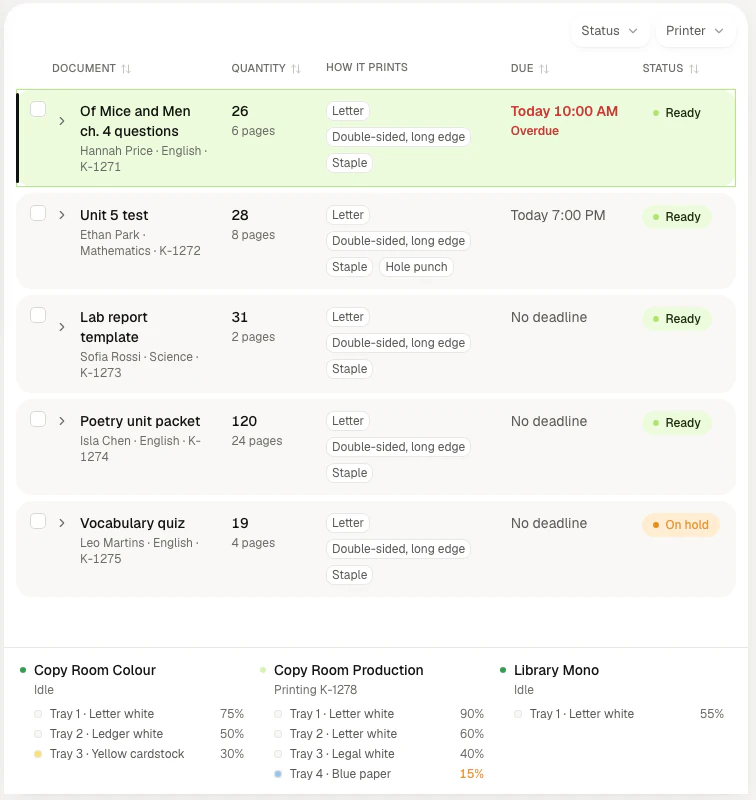
In the queue, each job shows its copies and page count, counted from the uploaded file on the server.
A page count that looks wrong for the document, such as a two-page worksheet showing three, is the first sign of a stray page. Open the job, and under Check before printing each document is listed with its first pages side by side, up to twelve, and View opens any page without leaving the queue. A blank or sideways page shows here.
When something is wrong, Hold the job and say why. The teacher sees it on their own list as "The copy room has paused this:" followed by the reason. In the demo school, the Vocabulary quiz is on hold with "Page 3 is cut off on the right. Can you resend the file?"
Print one copy to check first#
On a job of 20 sheets or more, the menu beside Print offers Print one to check first. One copy goes to the copier, and when it comes out the job goes back on hold with "Test copy printed. Check it, then press Print for the full run."
That one set is where an empty back or a blank page between sections is caught, before the other 119. Test copies are on by default.
What KyberCopy does not do#
KyberCopy does not edit a teacher's file, remove blank pages, skip pages or print a page range; the whole file prints, so a stray page is fixed in the file and sent again. It does not add a banner page to any job. It cannot see a blank sheet come out of the copier. When a copier reports itself out of toner, KyberCopy emails the school's administrators and owners.
Questions people ask#
Why is my printer printing blank pages? Usually an empty page in the document, toner that is out, or a new cartridge still sealed. Print the copier's own test page first to tell the printer from the file.
Why does a PDF print blank? Print one page to test. Open the PDF in another viewer and print again, and if the viewer offers print as image, try that, since every page then goes as a picture. If PDFs print blank and other files do not, check that the copier reads PDF directly. KyberCopy's relay tells the copier a PDF follows instead of letting it guess.
Why is my printer printing blank pages when it has toner? Look for a seal on the cartridge, a drum that is not seated, or a document with empty pages in it. From one computer only, check that computer's driver.
Why does my printer print an extra blank page? The document ends with an empty page or a page break, a banner page is on, or a double-sided job has an odd number of pages.
Why is my printer printing blank pages with symbols? The copier read the file in the wrong language and printed its code as text. Send the file as a PDF, or tell the copier which language follows.
Why is my printer printing blank pages from one computer? The driver on that computer is wrong for the model, or it adds a separator page. Print the same file from another computer to confirm.